NodeJS的练习题
习题
代码发布在Github仓库
今天好homie甩我个NodeJS的练习题,来看看怎么个事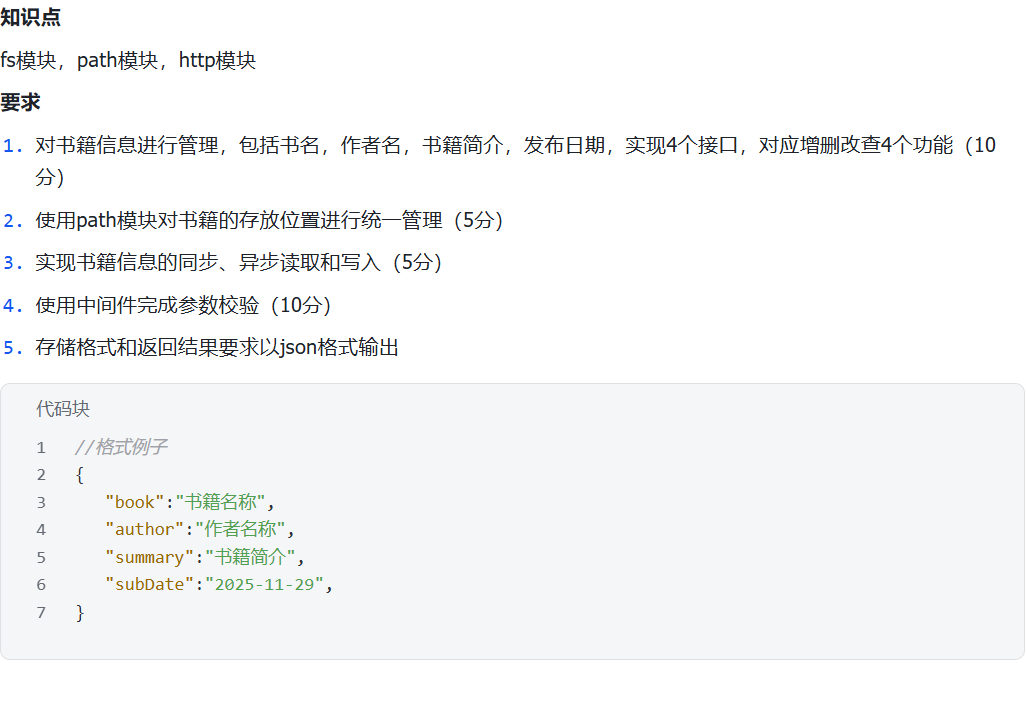
分析一下,该怎么实现呢?
知识点要求
fs模块——文件系统操作
path模块——路径处理
http模块——Web服务器
要实现以下功能
CRUD操作——增删改查书籍信息
path管理——统一管理文件路径
同步异步——实现两种读写方式
参数校验——验证输入数据
JSON格式——响应格式统一
怎么整呢?俺寻思也妹发个压缩包啊……
只能新建文件了
—-根目录
—书籍
-book{i}.txt
—-main.js
—-book.json
这样就在 书籍 目录下创建了以下文件book_1.txt
接下来写初始的book.json,包含上述的文件属性
在book.json写入了以下文件
1 | [ |
到这里算是把木有的东西补齐了
正式开始分析
已有的条件
book.json 存储书籍元数据
./书籍/book_{i}.txt 存储书籍内容
public/ 静态资源目录
格式示例已给出
不能用Express框架
估计题目要考察原生能力(Holly sh*t)
使用原生 http 模块
- 需要手动处理路由(无能狂怒)
- 需要手动解析请求体(有能狂怒)
那怎么设计API接口
要求4个接口实现CRUD…
增 使用 POST 请求 /api/books 创建新的书籍
删 使用 DELETE 请求 /api/books/:id 删除指定书籍
改 使用 PUT 请求 /api/books/:id 更新指定书籍
查 使用 GET 请求 /api/books 获取所有书籍
额外需要:
查内容 使用 GET 请求 /api/books/:id/content
写内容 使用 POST 请求 /api/books/:id/content
所以采用了RESTful的设计API的思路
关于RESTful API可以看一看这位先生写的文章 理解RESTful架构。
那怎么存储和管理数据
1 |
|
那
book.json 就用同步读写
因为它数据量小,需要立即返回结果
而
book_*.txt → 异步读写,但也能选同步
因为它文件可能很大,避免阻塞
那怎么实现同步和异步
Node.js 提供了以下API:
1 | // 同步 阻塞 |
我在我的博客文章写过同步和异步
1 | GET /api/books/0/content?mode=sync // 同步 |
即可实现同步和异步读写
那怎么做参数校验
需要验证的字段
1 | { |
这样一来,只要
1 | function validateBookData(data) { |
就行了
技术实现
后端:
- http 用于创建服务器
- fs 用于文件操作
- path 用于路径处理
- url 用于URL解析
- JSON 用于数据交换格式
前端:
- 原生HTML/CSS/JS
- Fetch API 用于AJAX请求
- 模态框 用于编辑/查看界面
相关代码如下
http服务器
1 | const server = http.createServer((req, res) => { |
请求体解析
// POST和PUT需要读取请求体
let body = ‘’;
req.on(‘data’, chunk => {
body += chunk.toString();
});
req.on(‘end’, () => {
const data = JSON.parse(body);
// 要处理的数据
});
路径管理
1 | //这样使用path模块 |
静态文件服务
1 | // 使用MIME类型映射 |
错误处理
1 | try { |
测试
测试获取书籍列表+
1 | curl http://localhost:3000/api/books |
测试添加书籍
1 | curl -X POST http://localhost:3000/api/books \ |
测试参数校验(空书名)
1 | curl -X POST http://localhost:3000/api/books \ |
测试同步读取
1 | curl http://localhost:3000/api/books/0/content?mode=sync |
测试异步读取
1 | curl http://localhost:3000/api/books/0/content?mode=async |